Final Project Proposal and Process

DEFINE (Final project proposal due 4/24)

  • Preproposal (outline initial project details, ideas, and scope)
  • Research (project, competitor, and inspirational research)
  • Client Survey
  • Collect Assets (textual content, images, graphics, etc.)
  • Develop Information Architecture and Flow Chart
  • Proposal

DESIGN (Present design comps in class on 5/1)

  • Thumnails
  • Rough Sketches
  • Color Palletes
  • Graphic Development
  • Rough Digital Comps
  • Refined Digital Comps

PRODUCE (complete as of final project due date - 5/22)

  • Determine production needs and methods
  • Optimize all imagery and graphics
  • Program a functional demo using appropriate technologies (HTML, CSS, Javascript, Flash, etc.)
  • Create template(s)
  • Integrate content with design tempates, designing/producing all pages

REFINE

  • Usability Testing
  • Functionality Testing (different browsers, screen sizes, modem speeds, platforms, etc.)
  • Edit/Proof all content
  • Refine, polish individual page designs
  • Search engine/accessiblity review (ensure page titles, meta tags, alt tags, etc.)
  • Deliver final site (due 5/22)

Final Project Proposal (due 4/24)

Write a 2-3 page formal proposal for your final project. Use the proposal to figure out what you plan to do and how you plan to do it. The proposal will help to organize your thinking, clarify your objectives, develop your intended look and feel, and provide you with an action plan. A well-developed proposal can ultimately save you time. Prior to writing your proposal, you should conduct a client survey (even if you are giving the survey to yourself) as the answer to the survey questions will form much of the content of your proposal.

Your proposal should include the following info/sections:

Project Summary: Write a one paragraph summary of your project.

Objectives: Specify the communication objectives of your project.

Look and Feel: Describe the intended look and feel of your project, including any ideas for thematic elements and possible fonts, colors, graphics, compositional arrangement, etc.

Navigation and Functionality: Describe how the project will work, what it will do, and how users will use it. Describe your planned navigational scheme/menu and information architecture.

Content Outline and Deliverables: Quality content drives quality websites. Specify the content that will be included on each page of your project. Describe all the elements (text, photos, graphics, audio, animation, and any other assets) that will be delivered in the final project.

Project Work Plan and Schedule: Explain your plan of action-- your planned steps and work schedule in order to deliver the project on time (on 5/22).

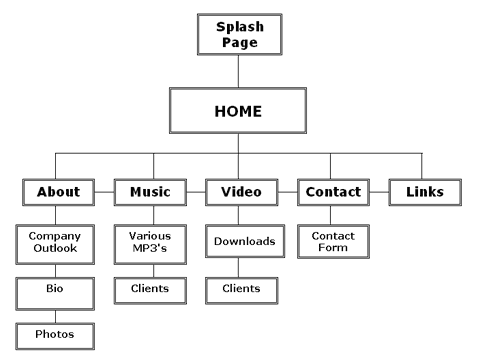
Site Map/Flow Chart: Provide a flow chart that illustrates the content and navigation of your project. Bring your site map/flow chart to class. View a sample flow chart here.

Thumbnails/Sketches: Draw 8-12 thumbnails to develop page layout ideas for the site (sized such that around 6 or 8 or so would fit on one page). Choose at least two of these to develop further, and sketch these out in greater detail (sized such that 1 or 2 would fit on one page). See some example thumbails here. You can also download this printable template for drawing thumbnails.